Setup - Architecture
EnQualify consists of two main component groups: client and server. This section describes what the components are, how they relate to each other, and the recommended server configurations for the production environment.
Components
EnQualify components are divided into two groups: Clients and Servers. The tables below summarize these components and the role of each.
📌 For information on the relationships and integration services between the components, see the Relations section.
Clients
Client components are the layer through which end users or mobile applications access the EnQualify system.
| Component | Platform | Description |
|---|---|---|
| EnQualify Web UI | All modern browsers supporting HTML5, JS, and WebRTC | A single-page web application (SPA) used for back-office and administration operations. |
| EnQualify Mobile SDK | iOS / Android / Huawei | The SDK containing all functions and interface elements required for mobile applications to access EnQualify servers and implement verification flows. |
Servers
Server components are the core service layer of EnQualify. They can be hosted on Windows and Linux with IIS or Docker.
| Component | Operating System | Hosting | Network Location | Description |
|---|---|---|---|---|
| EnQualify Web | Windows / Linux | IIS / Docker | LAN | Hosts static web files for back-office and administration interface. |
| EnQualify Web API | Windows / Linux | IIS / Docker | LAN | Includes core business functions, tasks, and API methods for the Web UI and integration services. |
| EnQualify Mobile API | Windows / Linux | IIS / Docker | LAN | Contains API methods used by the Mobile SDK. |
| EnQualify Mobile API Proxy | Windows / Linux | IIS / Docker | DMZ | Acts as a proxy for the Mobile API. It is deployed only in environments using an internal DMZ. |
| EnQualify Integration API | Windows / Linux | IIS / Docker | LAN | Contains API methods available to integration services. |
| EnQualify ADAuth API | Windows | IIS | LAN | Used for Active Directory authentication in scenarios where the Web API runs on Linux. |
| EnQualify Signalling | Linux | Docker | DMZ | Manages signaling functions between communication parties. |
| EnQualify CoTurn | Linux | Docker | DMZ | Provides TURN and STUN services. |
| EnQualify AI App | Linux | Docker | LAN | The main (master) AI system managing the Face Recognition Server and Passive Liveness Model Server components. |
| EnQualify Face Recognition Model Server | Linux | Docker | LAN | Executes face recognition checks. |
| EnQualify Passive Liveness Model Server | Linux | Docker | LAN | Executes passive liveness checks. |
| EnQualify Utils | Linux | Docker | LAN | Contains functions for hand, screen, and glasses detection. |
ℹ️ For detailed configuration information about the AI App and MediaServer components, see the AI Components document.
Data Servers
| Component | Description |
|---|---|
| EnQualify DB | MS SQL (2017 and above) or PostgreSQL (15 and above) database. |
| File Store | File storage area where video files and archives are stored. |
Server Integrations
Integration points that EnQualify establishes with external systems.
| Component | Description |
|---|---|
| AD Integrations | Used for Active Directory authentication via EnQualify Web API or ADAuth API. |
| Integration Services | Third-party services that use EnQualify Web APIs or provide methods for the EnQualify Integration API. |
Relations
The following diagram shows the relationships between all components and integration services.
Common
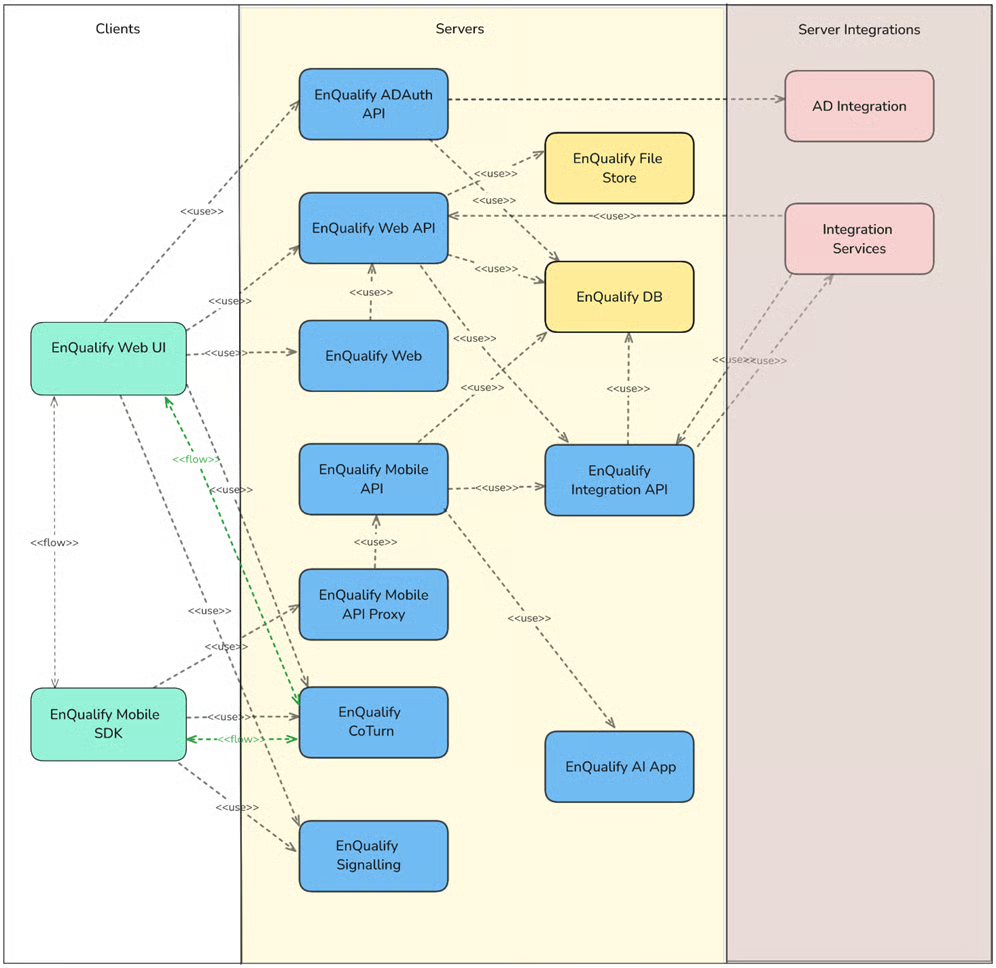
Diagram summary: The Clients layer includes the Web UI and Mobile SDK. These connect to the server components (Web API, Mobile API, Integration API, etc.) located in the LAN. In the DMZ, Signalling, CoTurn, and Mobile API Proxy are positioned. On the right side, AD Integration and Integration Services are shown as external integration points.