Backend - Call Center Integrations
This section explains how EnQualify integrates with call center systems.
Components
The following diagram shows all the components involved in Call Center integration and their relationships.
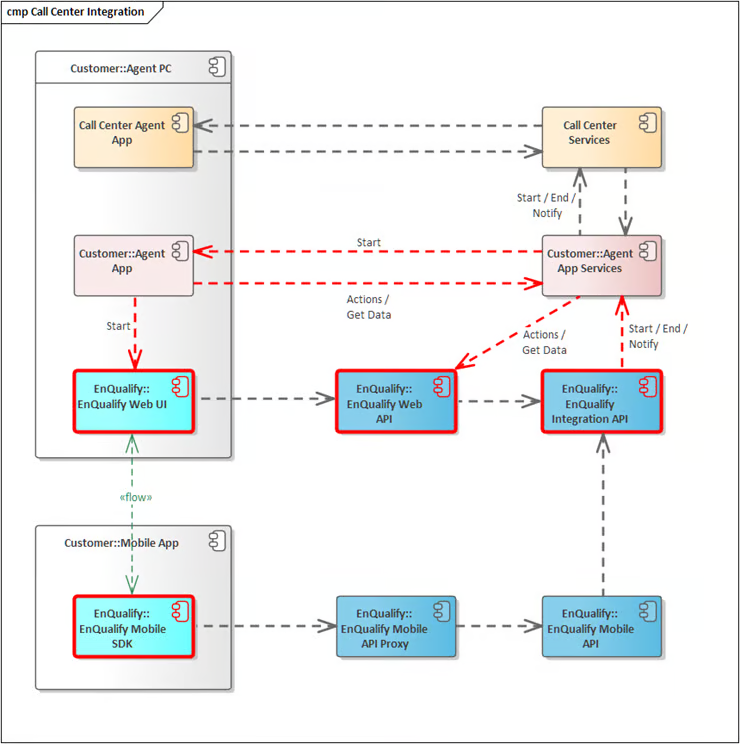
Additional Call Center Components
Call Center integration works with the following components in addition to the standard EnQualify components:
| Component | Description |
|---|---|
| Call Center Agent App | The agent application of the call center system. |
| Call Center Services | Hosts all components and services of the call center system. |
| Agent PC | Computers used by agents where various applications including EnQualify Web UI run. |
| Agent App | The agent application embedding the EnQualify Web UI. |
| Agent App Services | Services used by Agent App or EnQualify. |
Prerequisites and Operational Rules
- The responsibility for agent assignment lies with Call Center Services. EnQualify cannot assign agents to sessions.
- Agents must also be defined in EnQualify.
- Agent App Services interacts with Call Center Services.
- EnQualify Web UI is launched in a browser by the Agent App to start the session; at the end of the session, the browser page is closed.
- Agent App and Agent App Services interact with EnQualify Web UI via EnQualify Web API actions.
- EnQualify sends status notifications to Agent App Services.
- Agent App Services sends status notifications to EnQualify.
- Call media is recorded by EnQualify.
Sequence
The following diagram shows the flow of a Call Center integration from start to finish.
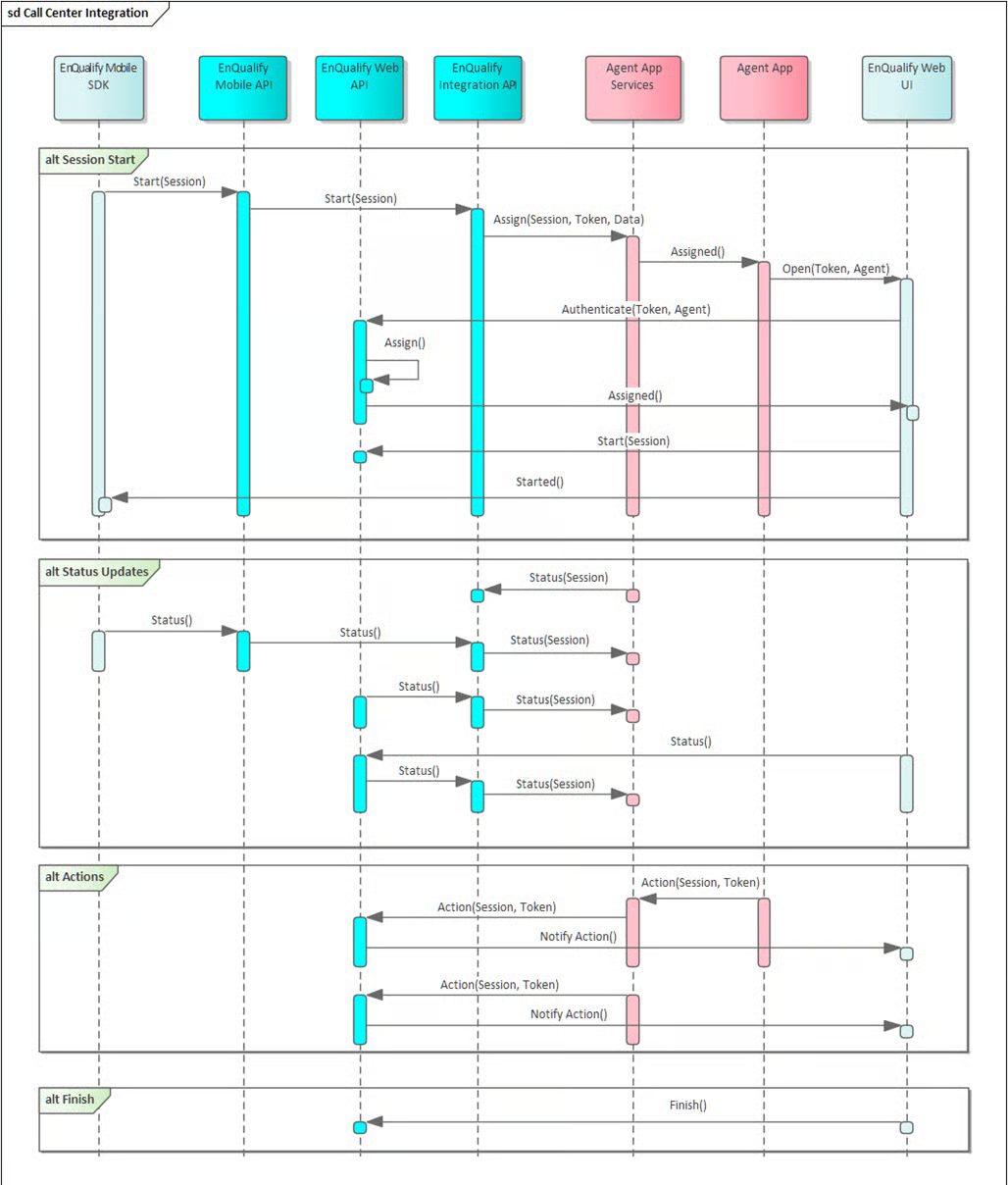
Flow Summary:
| Step | Description |
|---|---|
| Session Start | EnQualify sends a notification to Agent App Services to start the session with a token. Agent App Services calls Call Center Services to assign an agent to the session. The Agent App opens EnQualify Web UI with the token and agent identifier. EnQualify verifies the agent's identity. |
| Status Updates | Throughout the session, mutual status notifications (Status()) are exchanged between Mobile SDK, Mobile API, Web API, Integration API, and Agent App Services. |
| Actions | Agent App Services triggers session-specific actions via Web API (Action(Session, Token)). EnQualify Web UI reports the action (Notify Action()). |
| Finish | Agent App Services terminates the session (Finish()). |
Step-by-step Summary:
- EnQualify sends a notification to Agent App Services to start the session with a token. Agent App Services calls Call Center Services to assign an agent.
- The Agent App opens EnQualify Web UI with the token and agent identifier.
- EnQualify verifies the agent's identity.
- The agent initiates the call.
- The agent terminates the call.
Genesys Integration
The following diagram shows the flow of integration between EnQualify and the Genesys platform.
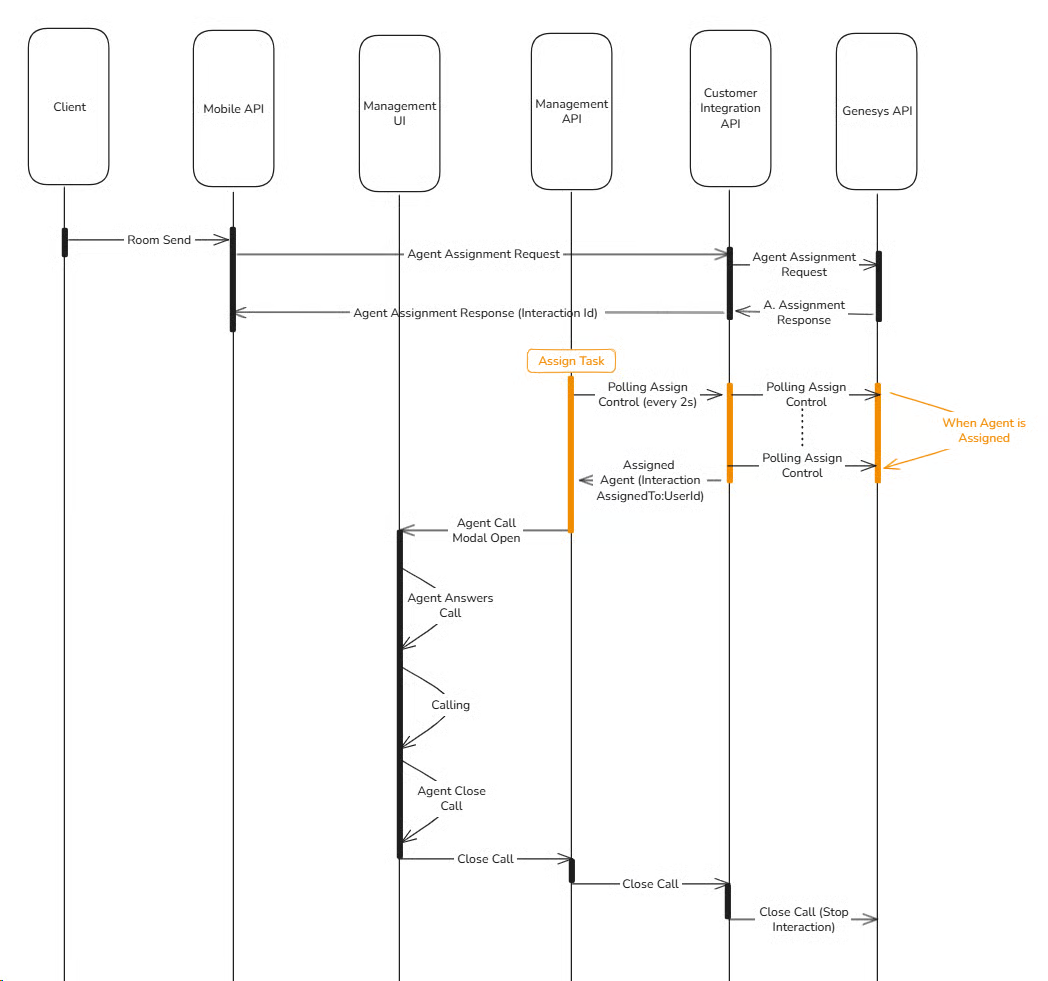
Flow Summary:
| Step | Actor | Description |
|---|---|---|
| 1 | Client → Mobile API | The client starts the session with Room Send. |
| 2 | Management API → Customer Integration API → Genesys API | The agent assignment request (Agent Assignment Request) is sent to Genesys. |
| 3 | Genesys API → Customer Integration API → Management API | The assignment response returns with Interaction Id. |
| 4 | Management API ↔ Customer Integration API ↔ Genesys API | Assign Task is created; Management API checks every 2 seconds with Polling Assign Control whether an agent has been assigned. |
| 5 | Genesys API → Customer Integration API → Management API | When an agent is assigned, the Assigned Agent (Interaction AssignedToUserId) information is sent. |
| 6 | Management UI | The Agent Call Modal opens. The agent accepts the call (Agent Answers Call). |
| 7 | Management UI ↔ Client | The call occurs (Calling). |
| 8 | Management UI → Management API → Customer Integration API → Genesys API | The agent closes the call. Close Call → Close Call (Stop Interaction) is sent to Genesys. |