Backend - Database
This section describes the EnQualify database structure; schemas, log tables, and essential data models.
Schemas
EnQualify database objects are divided into several schemas:
| Scheme | Description |
|---|---|
vrf | EnQualify application objects. |
core | Core system objects. |
doc | Document system objects. |
log | Log tables. |
msg | Messaging system. (Not used in EnQualify) |
bpm | Process management. (Not used in EnQualify) |
Logs
Log Tables
| Table | Description |
|---|---|
vrf…Log | EnQualify functional logs. |
log.ApplicationLog | Application runtime logs. |
log.RequestLog | API request and response logs. |
log.ActivityLog | Business activity logs. (Not used in EnQualify) |
log.AuditLog | Audit logs. (Not used in EnQualify) |
log.ProcessLog | Process management logs. (Not used in EnQualify) |
EnQualify Logs
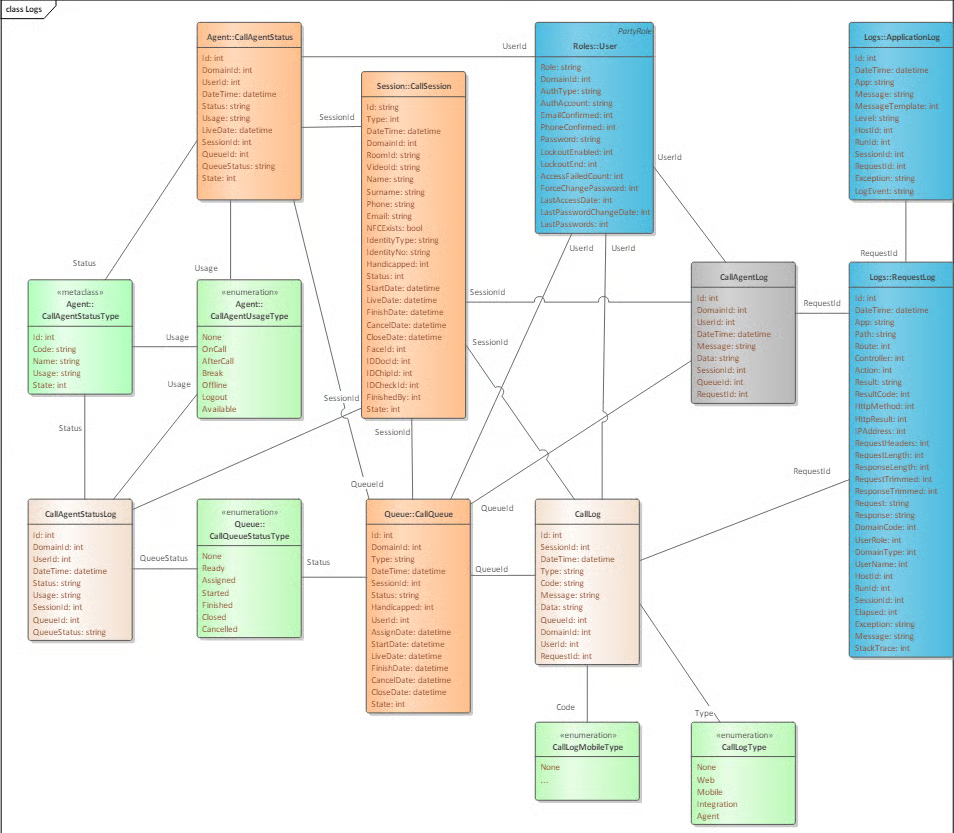
EnQualify validation process and activity logs are kept in the tables of the vrf schema. These logs are a fundamental part of the validation data.
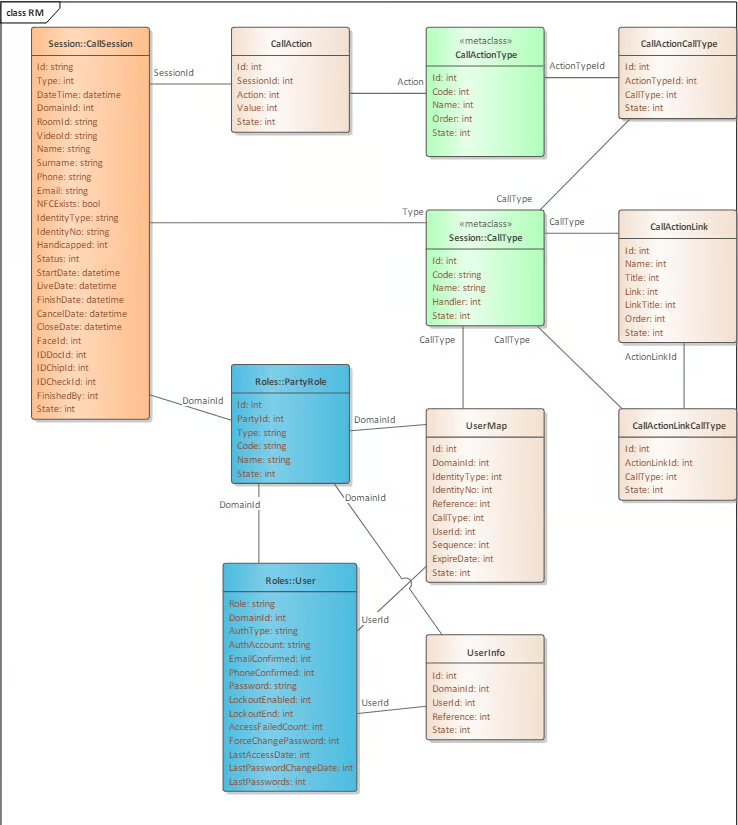
⚠️ Important: EnQualify log tables must not be removed before the corresponding validation data is deleted or moved from the database. EnQualify log tables are shown in the Data Model section.
Application Logs
Application logs are written to a temporary file in the environment where the application is running. Log levels are configured from the application's configuration file. When the application connects to the database, logs are also written to the log.ApplicationLog table.
Log content:
- Contains information about how the application is performing.
- May include detailed debug information depending on the configuration.
- Does not contain business data or sensitive data.
Related tables:
| Table | Description |
|---|---|
core.AppHost | Host information where the application is running. Related to the log table via HostUId. |
core.AppRun | Application process information. Related to the log table via RunUId. |
core.UserSession | User and user session information. Can be linked to the log entry. |
log.RequestLog | If the log entry is associated with a request, the RequestId field is populated. |
Cleanup: Old application logs may be deleted or moved from the database according to the data policy.
SQL Examples:
sql
-- Warning: Queries should not block other operations!
-- Use ReadUncommitted isolation level or nolock hint in SqlServer.
-- Limit the number of records with TOP or LIMIT.

-- App Host list
SELECT * FROM core.AppHost;
SELECT * FROM core.AppHost WHERE App = 'Management.API';

-- App Run list
SELECT TOP 10 * FROM core.AppRun WHERE App = 'Management.API';
SELECT TOP 10 * FROM core.AppRun WHERE StartDate >= '2022-01-01';
SELECT TOP 10 * FROM core.AppRun WHERE HostUId = 'F0D506FE-13A7-40DE-974A-A631BF3CB03C';

-- Application Log list
SELECT TOP 100 * FROM log.ApplicationLog WHERE App = 'Management.API';
SELECT TOP 100 * FROM log.ApplicationLog WHERE HostUId = 'F0D506FE-13A7-40DE-974A-A631BF3CB03C';
SELECT TOP 100 * FROM log.ApplicationLog WHERE SessionUId = '8A915A26-C5B1-4F94-BB34-37AD03C8984A';
SELECT TOP 100 * FROM log.ApplicationLog WHERE DateTime < '2022-01-01';
Request Logs
API request and response messages are stored in the log.RequestLog table.
Important information:
- Request and response data is not written directly to the table; after sensitive and unwanted data is cleaned, the internal JSON view of the HTTP request/response bodies is stored.
- If the data is too large, it is truncated before storage.
- Log and status requests as well as invalid requests are not recorded.
- The log entry includes application information, the section processing the request, IP address, request headers, and processing time.
Related table:
| Table | Description |
|---|---|
log.RequestSignature | Holds the signatures of signed request messages sent by mobile applications. |
Cleanup: Old request logs may be deleted or moved from the database according to the data policy.
SQL Examples:
sql
-- Warning: Queries should not block other operations!
-- Use ReadUncommitted isolation level or nolock hint in SqlServer.
-- Limit the number of records with TOP or LIMIT.

-- Request Log list
SELECT TOP 100 * FROM log.RequestLog WHERE App = 'Management.API';
SELECT TOP 100 * FROM log.RequestLog WHERE HostUId = 'F0D506FE-13A7-40DE-974A-A631BF3CB03C';
SELECT TOP 100 * FROM log.RequestLog WHERE SessionUId = '8A915A26-C5B1-4F94-BB34-37AD03C8984A';
SELECT TOP 100 * FROM log.RequestLog WHERE DateTime < '2022-01-01';

-- Request Signature list
SELECT TOP 100 * FROM log.RequestSignature WHERE DateTime < '2022-01-01';
Data Model
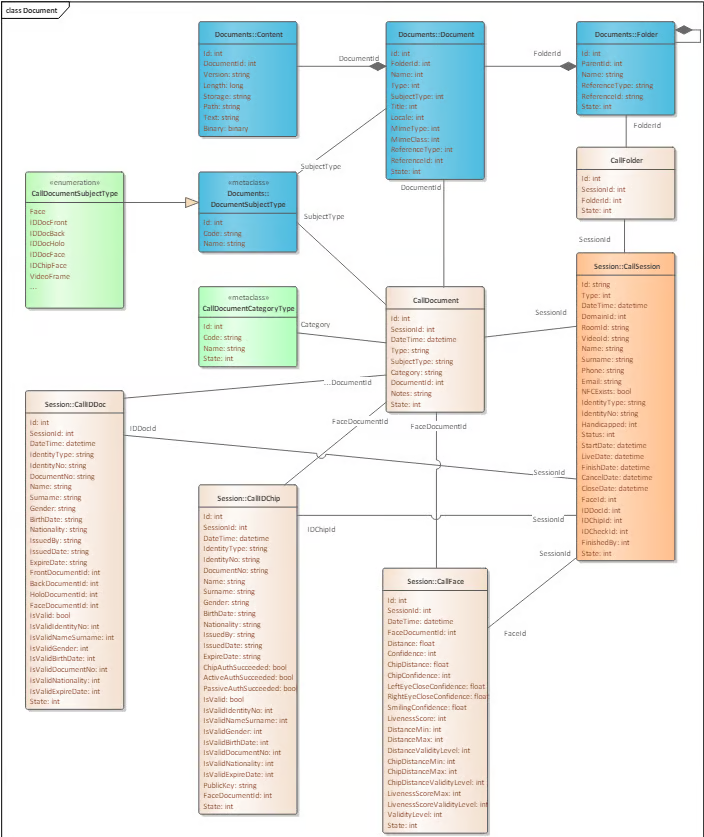
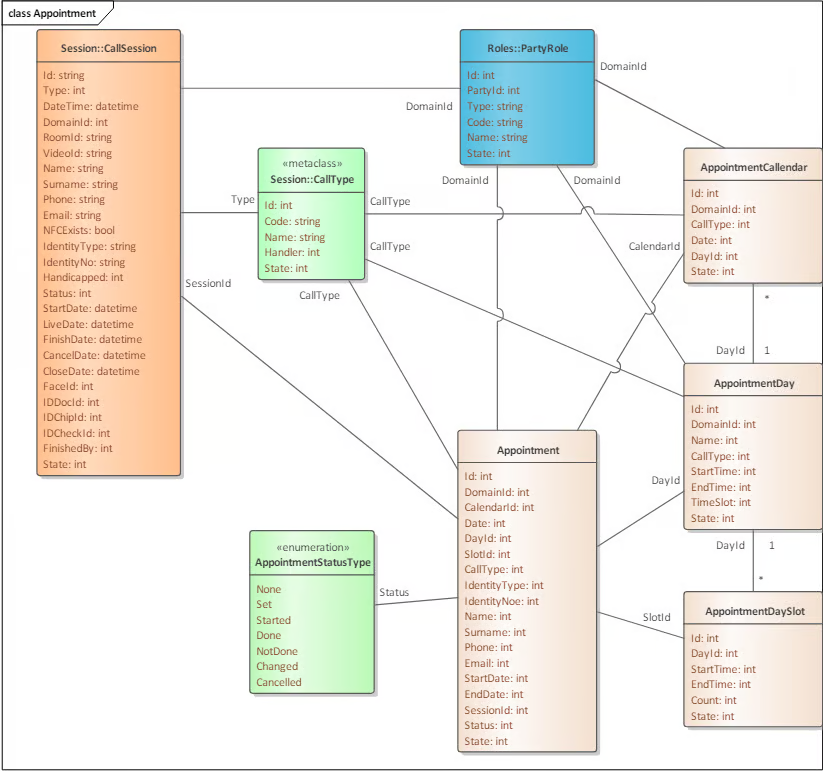
The following diagrams show the core data models and relationships used in EnQualify. The diagrams do not include actual data types and details of internal relationships in the database. Common tables have been omitted for simplicity.
Summary
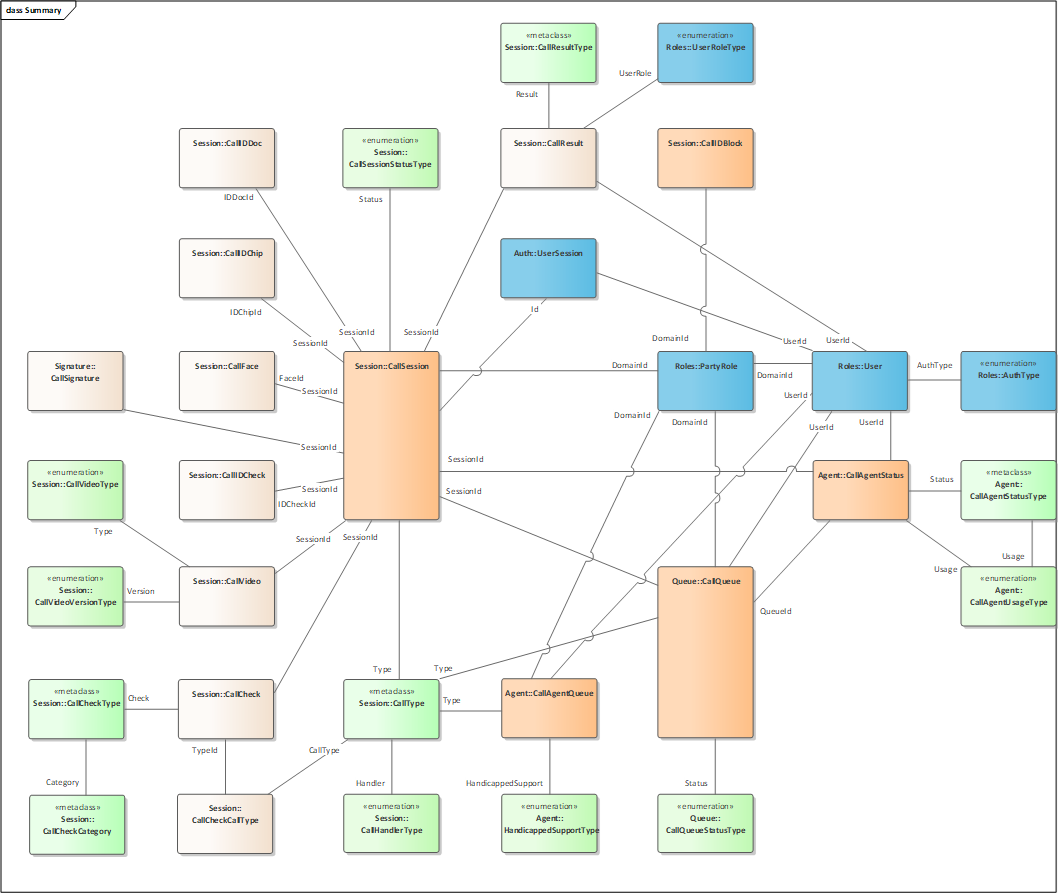
Diagram summary: Provides a general map of all data models.
CallSessionis the central table; verification tables such asCallFace,CallIDDoc,CallIDChip,CallIDCheck,CallVideo,CallResult,CallCheckare associated with the Session. Sets such asAgent,Queue,Roles,Auth::UserSession, andDocumentare also related to this central structure.
Session
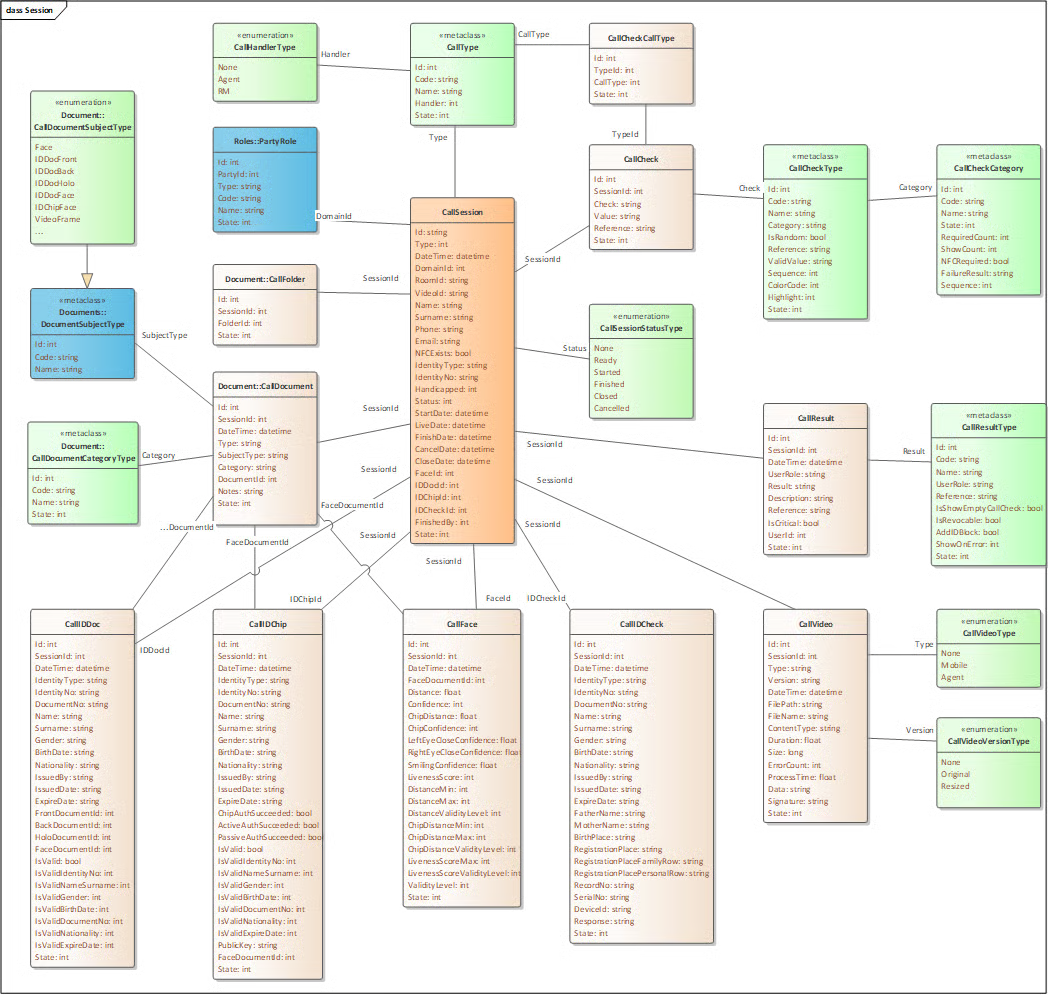
Diagram summary: The
CallSessiontable is associated with theCallIDDoc,CallIDChip,CallFace,CallIDCheck,CallVideo,CallResult,CallCheck, andCallQueuetables. Each verification step (OCR, NFC, Face, Video) is stored in a separate table and linked viaSessionId.
Document
Integration
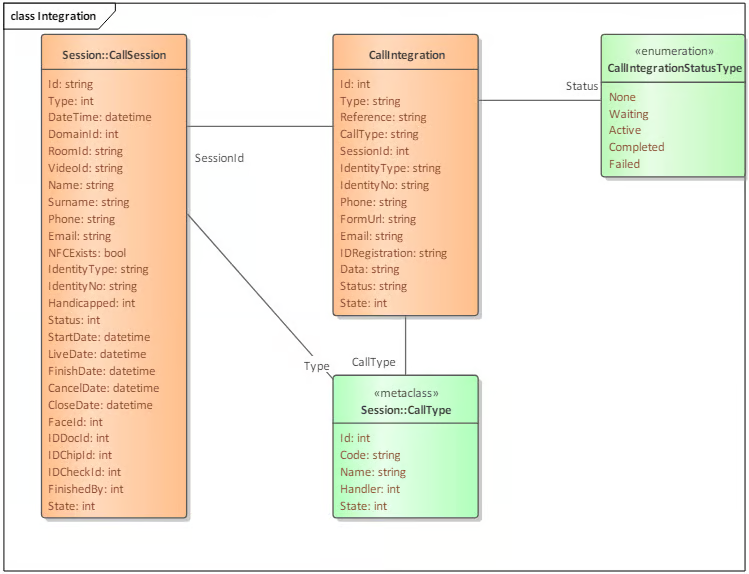
Agent
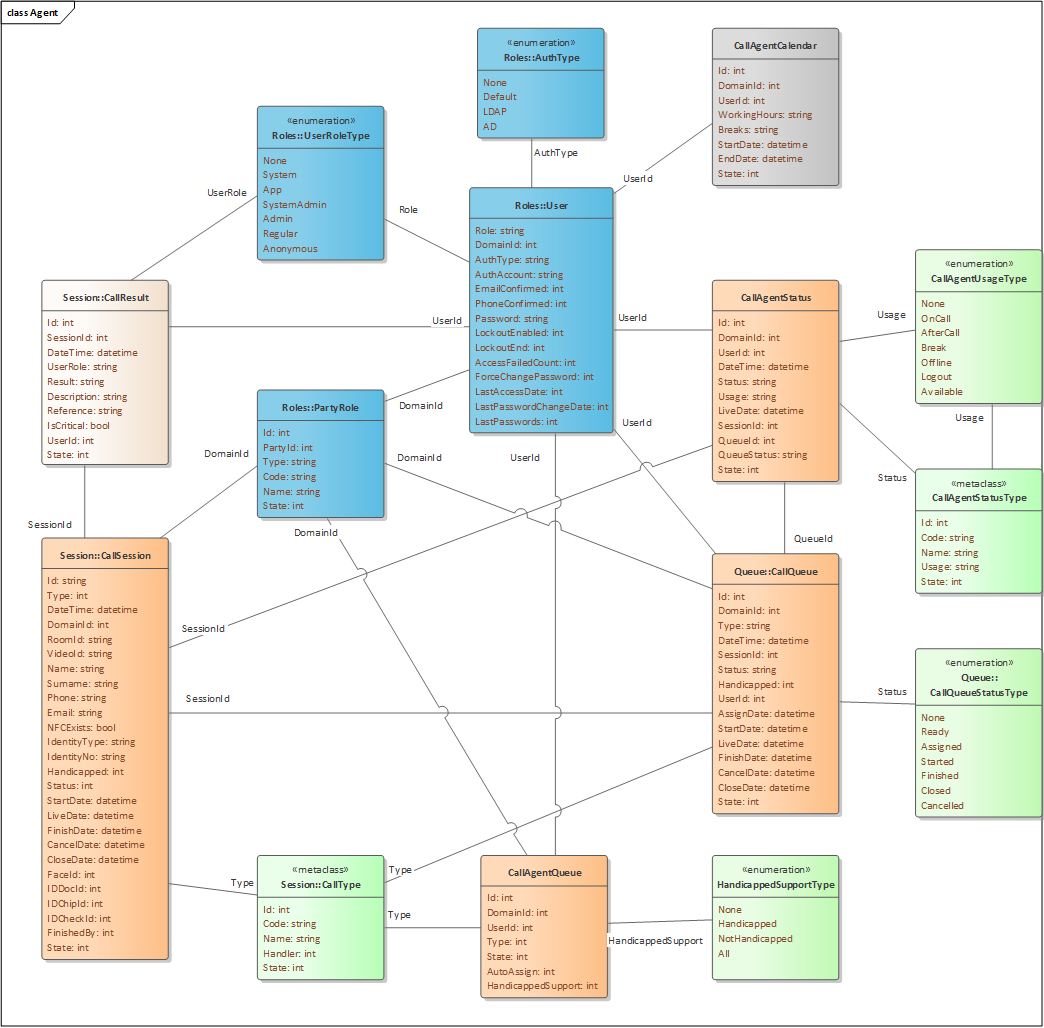
Queue
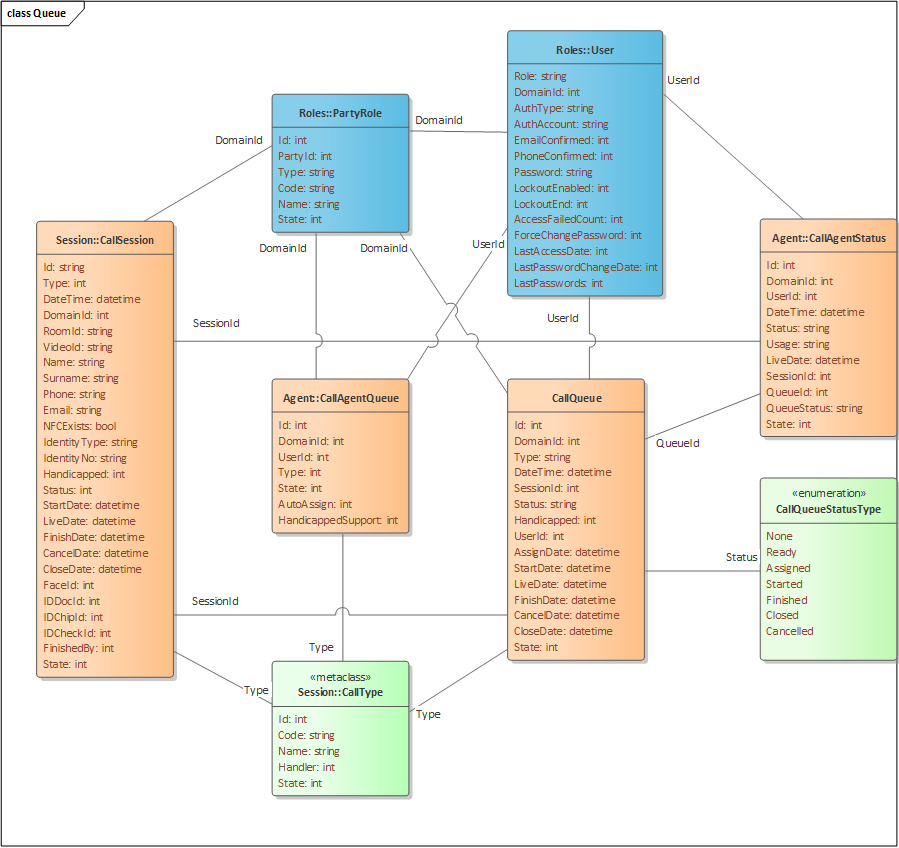
Signature
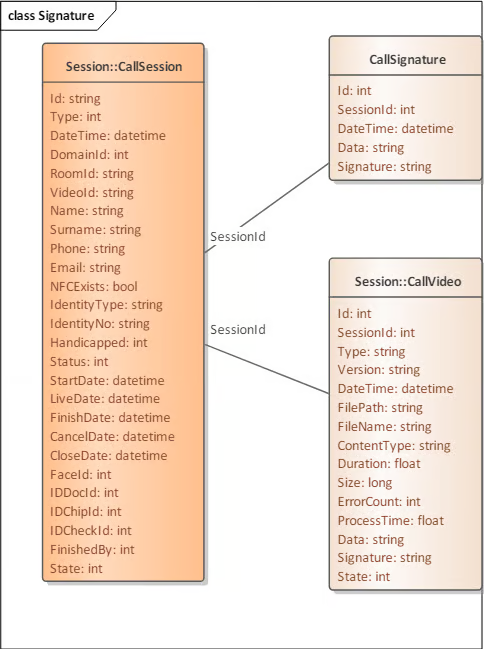
Logs
Appointment
RM (Relationship Manager)