Backend - Integrations
Definitions
Terms used in this document:
| Term | Description |
|---|---|
| Mobile Application | The mobile application belonging to the customer that will host EnQualify's mobile features. |
| Integration Services | Third-party applications that access EnQualify's integration methods or provide integration services for EnQualify. |
Integration Points
EnQualify offers three integration points for Mobile Applications and Integration Services:
| Integration Point | Used by | Description |
|---|---|---|
| Mobile SDK | Mobile Applications | Used for mobile application integrations. |
| Web API (specific methods) | Integration Services | Specific Web API methods are called by Integration Services for integration tasks. |
| Integration API (customer-specific) | EnQualify → Integration Services | The customer-specific API used by EnQualify to access Integration Services. |
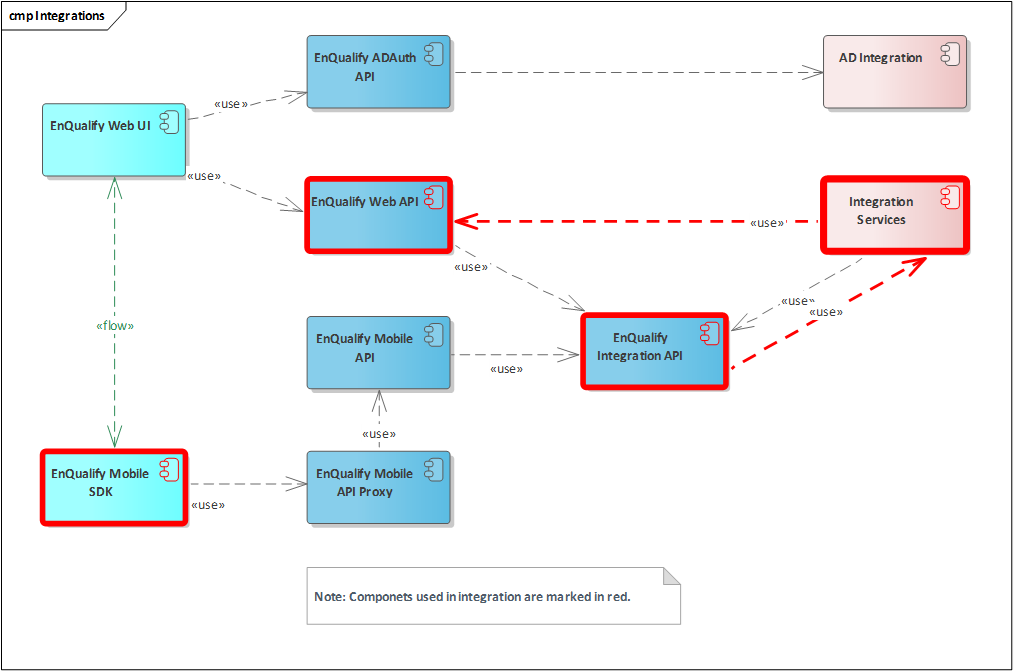
📌 The components involved in the integration are marked in red: EnQualify Mobile SDK, EnQualify Web API, EnQualify Integration API, and Integration Services.
Mobile SDK
Mobile application integrations are performed through the EnQualify Mobile SDK.
- The Mobile SDK includes all functions and components required to access EnQualify servers and implement verification flows and UI elements in mobile applications.
- The SDK does not contain implementation-specific features; however, it offers customization possibilities.
- Available on iOS and Android platforms.
ℹ️ Detailed information about the Mobile SDK is not included in this document. For details, see the EnQualify Mobile SDK documentation.
Web API
For integration tasks, Integration Services call specific methods of the EnQualify Web API. These methods and tasks are explained in detail in the following sections.
Swagger Open API
There is a Swagger Open API page and JSON file for EnQualify Web API applications.
-
The latest Web API methods and data models can be accessed at the following URLs:
- https://enqualifyapi-test.enqura.com/swagger/v1.0/swagger.json
- To access the Swagger page on a different API, ensure that the
OpenAPIsetting is enabled. - If the
Productionsetting is enabled, the Swagger page will not be displayed. - The Swagger page can be used for testing purposes.
- The provided Swagger Open API JSON file can be used for easy integration.
Integration API
Some integration features require EnQualify to make calls to Integration Services. For these cases, Enqura develops a customer-specific Integration API application.
- All Integration APIs provide common API methods that will be used by EnQualify APIs.
- Common Integration API methods used by EnQualify APIs are not directly called by Integration Services.
- There may be additional features or extra API methods in the Integration API.
- Common Integration API methods must be implemented with the methods provided by Integration Services.
Sequences
The diagram below shows the general flow sequence of the integration functions. The diagram is simplified, and some components and details have been removed. Integration functions are indicated in bold text in the diagram.
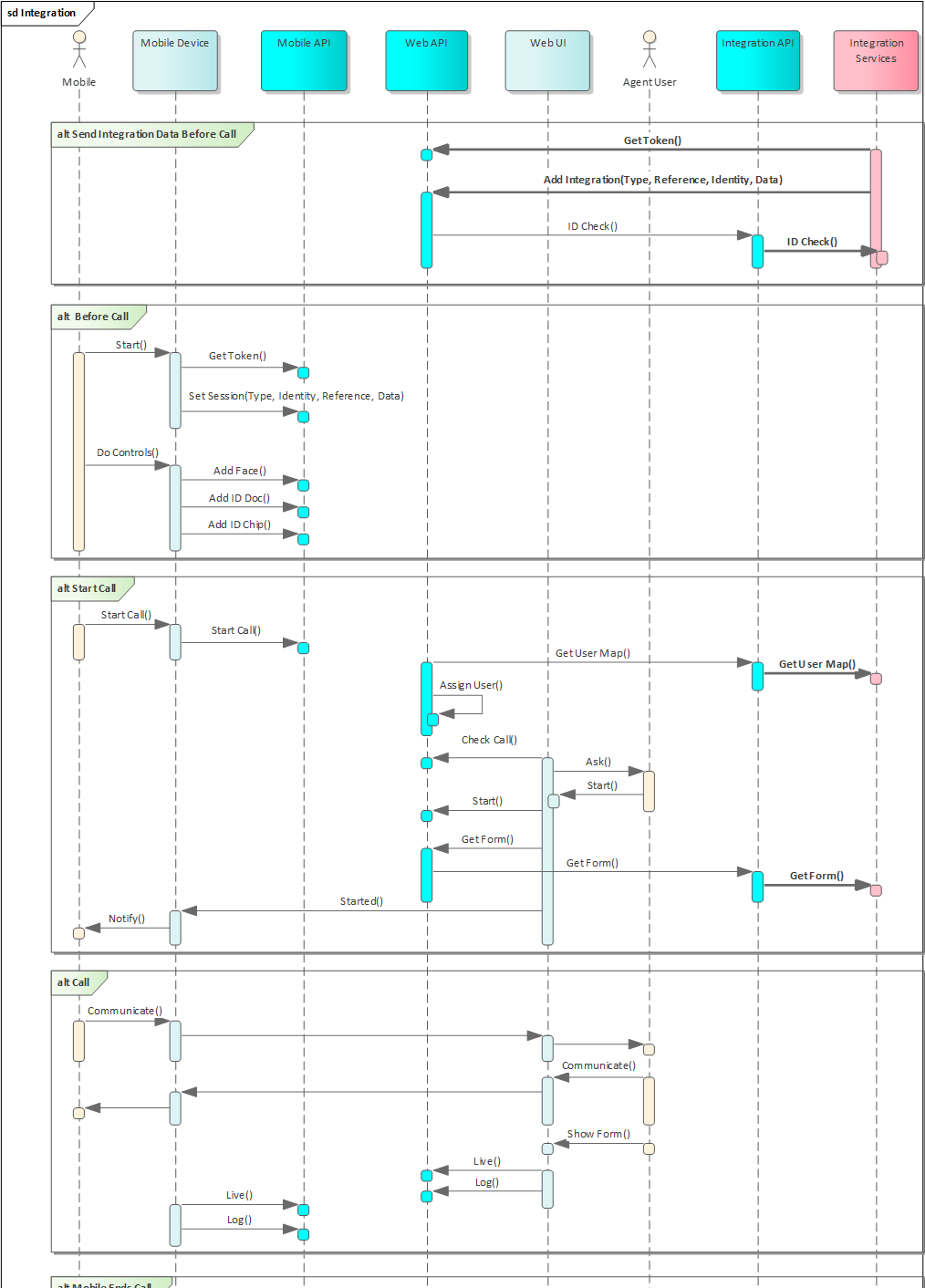
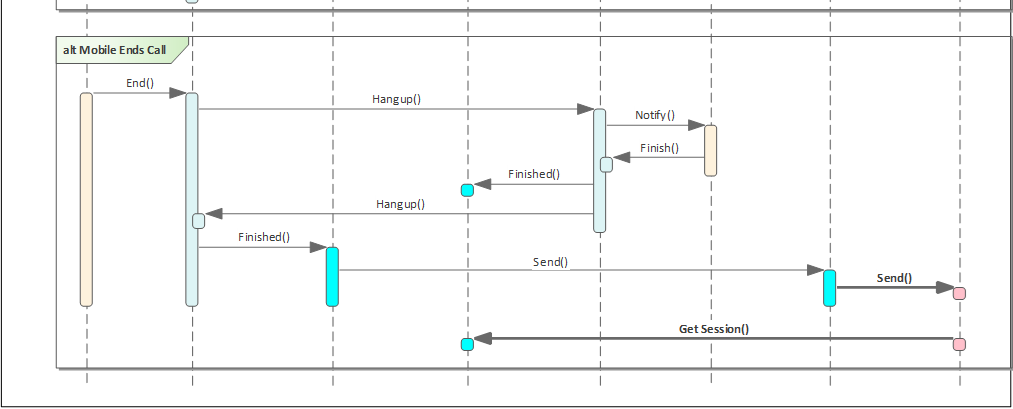
Flow Summary:
| Step | Actor | Main Functions |
|---|---|---|
| Send Integration Data Before Call | Integration Services → Web API | GetToken(), AddIntegration(Type, Reference, Identity, Data), IDCheck() |
| Before Call | Mobile → Mobile API | Start(), GetToken(), SetSession(Type, Identity, Reference, Data), DoControls() → AddFace(), AddIDDoc(), AddIDChip() |
| Start Call | Mobile → Mobile API → Web API → Integration API | StartCall(), GetUserMap(), AssignUser(), CheckCall(), Ask(), Start(), GetForm(), Notify() |
| Call | Mobile ↔ Web API ↔ Web UI | Communicate(), ShowForm(), Live(), Log() |
| Mobile Ends Call | Mobile → Mobile API → Web API → Integration API | End(), Hangup(), Notify(), Finish(), Finished(), Send(), GetSession() |